

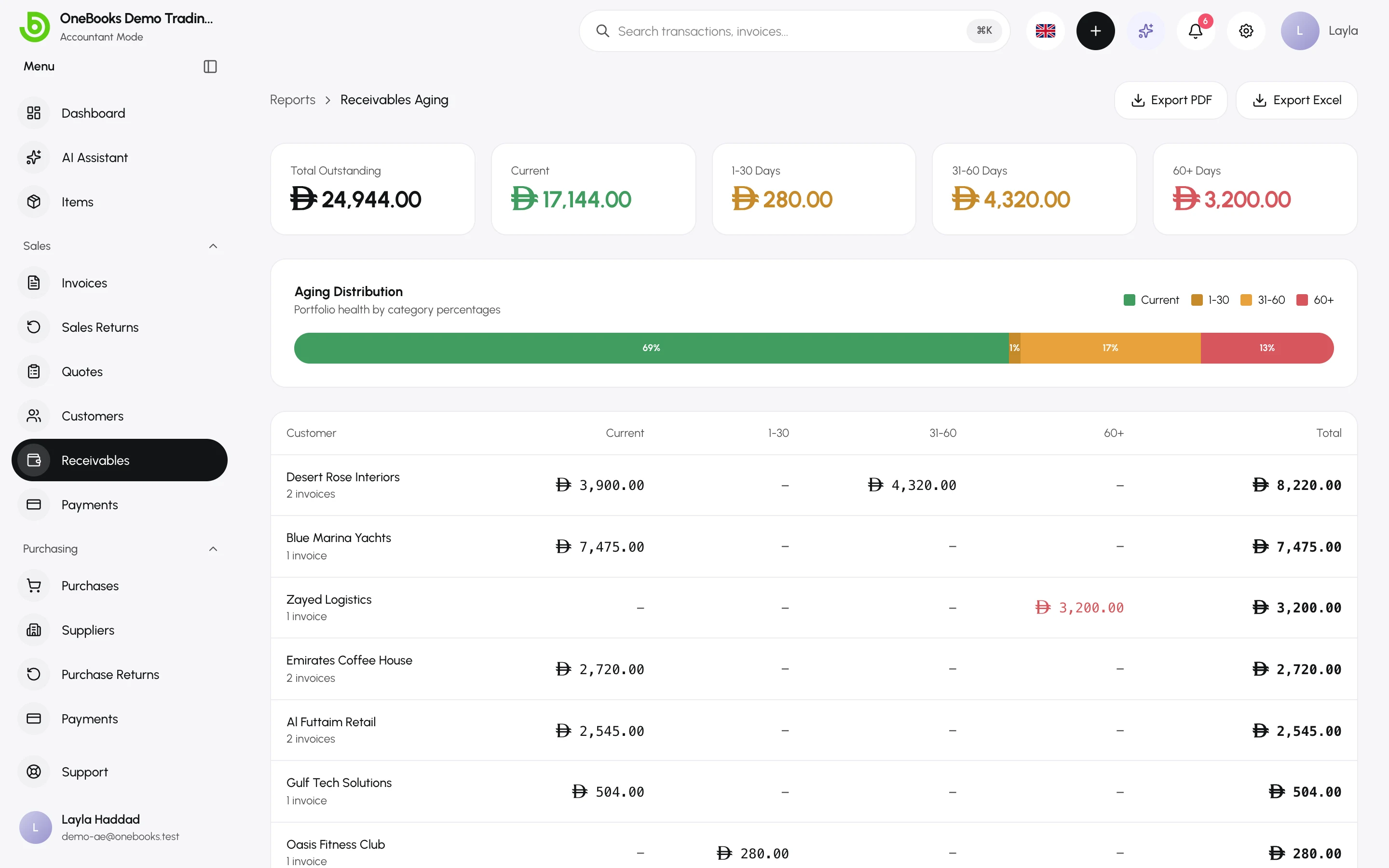
Sales → Receivables (called Who Owes Me in Simple mode) lists every customer with an open balance and splits it by how long the invoices have been outstanding. It is built from your sent, unpaid invoices, so it always matches the balances on the customer pages.
Reading the report
Section titled “Reading the report”- Total Outstanding — everything owed to you right now.
- Aging Distribution — the share of the total that is current, and the shares that are overdue by increasing age.
- The table — one row per customer with invoice count and the amount in each age bucket. Select a customer to open its page and its invoices.
Acting on it
Section titled “Acting on it”- Open the customer and send the invoice again by Email or WhatsApp.
- Record a payment when it arrives — Payments received.
- Agree a credit for disputed amounts — Sales returns and credit notes.
- Give up on a hopeless debt — Write off.
Export
Section titled “Export”Export PDF and Export Excel produce the same table for your records or your accountant.
Where else receivables appear
Section titled “Where else receivables appear”- The dashboard shows total receivables and an aging summary.
- The balance sheet shows Accounts Receivable (account 1100) — the ledger view of the same figure.
- The AI assistant can answer “who owes me more than 60 days?” from this data — Ask for reports.